
Embed blind watermarks without uploading your image
BlindWMLocal hides a text string inside a photo using frequency-domain embedding — the same family of technique as the open-source blind-watermark library, but executed entirely in your browser. There is no backend image API; your files never leave the device.
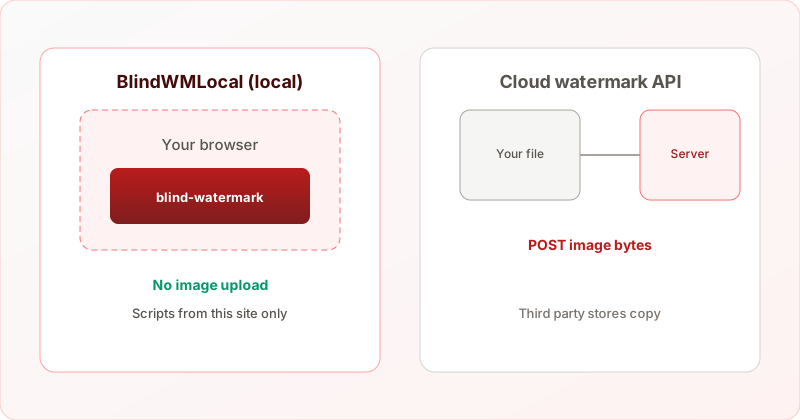
What is a “blind” watermark?
Unlike a visible logo, a blind watermark is a hidden payload — usually a short string such as an email, employee ID, or case number. It is spread across the image in a way that survives mild editing and re-saving, but is not obvious to viewers. You need the original embedding parameters (length and strength level) to decode it reliably.
Why avoid cloud watermark APIs?
- Privacy — HR photos, unreleased designs, and investigation assets should not be copied to a third-party server.
- Compliance — Teams under GDPR or internal data policies often cannot use “upload your file” tools.
- Auditability — Open DevTools → Network, or disconnect before choosing a file: embed still works offline once the page loads.
Try it — drop a photo, enter up to 128 characters, set embed strength.
Verify offline (strongest proof)
- Open Add watermark and wait until the page and library finish loading.
- Disconnect Wi‑Fi or enable airplane mode before you choose an image.
- Embed, then download — processing does not need network. See how it works for details.
Typical workflow on BlindWMLocal
- Choose a JPG, PNG, or WebP from your device (max 10 MB on this tool).
- Enter watermark text and adjust embed strength (maps to library level 1–2).
- Click Generate watermarked image. First run downloads the bundled library from this domain only.
- Choose JPEG, PNG, or WebP for download. Filenames include
_wm_len{N}_lvl{L}for later extraction — see our filename guide. - Optionally run Extract on a copy to verify the string before you share the file.
Detect vs extract
Extract recovers the hidden string when you have a watermarked file (and ideally the filename hints). Detect runs a broader blind-watermark probe for screening — useful for triage, not legal proof. Use Extract when you control the embed pipeline.
Limits to keep in mind
- Payload is text only (up to 128 characters on the embed page).
- Heavy JPEG recompression can weaken the signal — see JPEG quality vs extraction.
- Blind watermarks are not visible branding; they do not replace copyright notices on the image itself.